
VS Pop™ Composer — Type a sentence, get a full multi-track arrangement. Prompt-driven MIDI composition for any DAW.
Product description
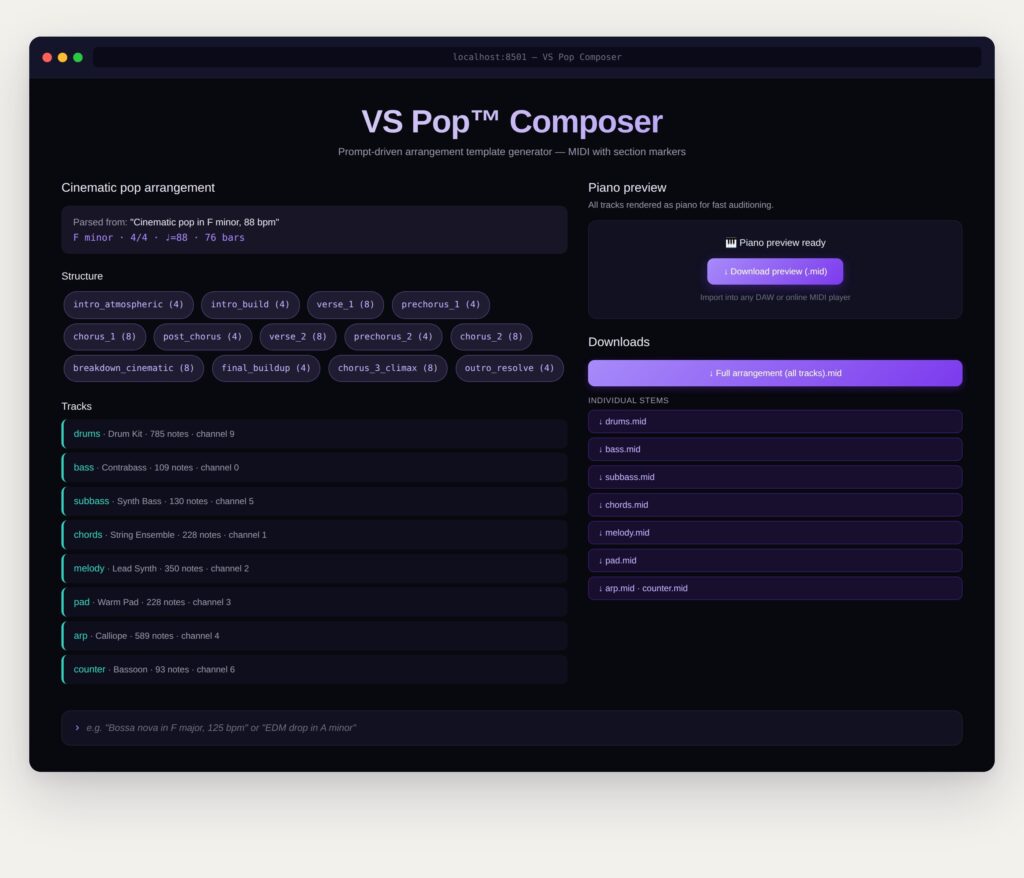
VS Pop™ Composer is a prompt-driven arrangement template generator. Type a plain-English description of the song you want — “Bossa nova in F major, 125 bpm” or “EDM drop in A minor” — and get back a complete multi-track MIDI arrangement with section markers, individual instrument stems, and a chord-progression summary you can drop straight into any DAW.
It runs locally on your machine. No cloud, no sample libraries, no audio rendering — just clean MIDI that imports natively into Logic, Cubase, Ableton, FL Studio, Pro Tools, Reaper, or anything else that reads a .mid file.
Key features
- Plain-English prompting — describe genre, key, mode, tempo, and time signature in one sentence; the parser handles the rest
- 20 supported genres across three complexity tiers — pop, rock, blues, country, jazz, EDM, house, trap, reggae, bossa nova, classical, film score, gospel, R&B, funk, latin, ambient, experimental, hip-hop, avant-garde
- Full multi-track output — drums, bass, sub-bass, chords, melody, pad, arpeggio, and counter-melody, each on its own MIDI channel with sensible GM program assignments
- Individual stems — every instrument exported as a separate
.midfile for full mixing control - Embedded section markers — intro, verse, prechorus, chorus, bridge, breakdown, outro (varies by genre — jazz uses AABA, blues uses 12-bar, classical uses sonata-allegro, etc.)
- Piano preview — all tracks rendered as piano in a single file for quick auditioning before you load it into your DAW
- Chord progression summary — roman-numeral analysis bar by bar
- Stochastic composition engine — VS Pop™ HMM + Genetic Algorithm for melody, with per-track density/register/role parameters from genre templates
- Local-first & private — no external services, no telemetry, no data leaves your machine
- No licensed content — the engine is trained on public-domain classical scores; output is yours to use
Technical specs
- Output format: Standard MIDI (
.mid), General MIDI compatible - Drum channel: GM channel 9 (standard mapping)
- Interface: Streamlit web UI, runs locally in your browser
- Dependencies: Python,
streamlit,pretty_midi - Install:
pip install streamlit pretty_midithenstreamlit run app.py - DAW compatibility: Universal — any DAW that imports MIDI
- License model: Commercial proof-of-concept, personal use
Who it’s for
Songwriters who want a starting skeleton instead of staring at a blank session. Producers prototyping ideas across genres they don’t normally write in. Composers who need a chord progression and section structure to react against. Educators demonstrating arrangement conventions. Anyone tired of clicking around template shops.
What it deliberately doesn’t do
VS Pop™ Composer outputs MIDI only — no audio rendering, no vocals, no DAW project files, no genre-current sonic aesthetics. The thinking: MIDI is the universal exchange format, your DAW and your sample libraries handle the sound, and you keep full creative control over the mix.
.
VS Pop™ Score Assistant
PDF sheet music → MusicXML, ready for Dorico, MuseScore, Sibelius, or Finale
A small companion tool · v0.1.1
Two ways to use it
Option 1 — The simple way (recommended). Email me the PDF score you’d like converted, and I will run it through the tool and send you back the MusicXML file the same day. I am happy to do this for as many scores as you’d like. No setup required on your end.
Option 2 — Run it yourself. If you or a graduate student would like to run the tool locally, the steps are below. About five minutes for someone comfortable with a terminal; happy to walk anyone through it on a quick call.
How the conversion goes
From your perspective:
- You send me a PDF score (any clean engraved score works best — printed, not handwritten).
- I run it through the Score Assistant. A few minutes per page on my machine.
- I email you back a .musicxml file. You open it in Dorico, MuseScore, Sibelius, or Finale via File → Import.
- If a few notes came out wrong, you can fix them in your notation software the same way you’d correct any imported score.
Honest note on accuracy: the engine is open-source and gets roughly 80–90% of notes right on clean printed scores, less on dense or unusual notation. This is normal for any optical music recognition tool, including the commercial ones like ScanScore. For complex pieces I’m happy to do a manual cleanup pass myself before sending the file back to you.
If you’d like to run it yourself
One-time setup. The tool is a small Python application built on top of an open-source music-recognition engine.
1. Install Poppler (one time)
Poppler is a free PDF rendering library. The tool needs it to convert PDF pages into images.
- On a Mac with Homebrew:
brew install poppler
- On Windows: download the latest Poppler release, unzip it, and add its bin folder to your PATH.
2. Install the Python pieces
From inside the project folder, in a terminal:
pip install oemer pdf2image opencv-python music21 streamlit
The very first conversion will download about 300 MB of model files. This happens automatically and only once.
3. Start the app
streamlit run pdf_to_musicxml/streamlit_page.py
This opens a webpage in your browser. Drop the PDF in, click Convert, download the MusicXML when it finishes.
Files included with this email
- Quick Start.docx — this document.
- Sample input.pdf — a printed piano score, included so you can see the kind of input that works well.
- Sample output (structure preview).musicxml — a structural preview of what the converted file looks like (correct title page, key signature, time signature, and tempo markings, with blank measures). The actual recognized notes appear once the tool is run on a local machine. This is included so you can see how the format opens in your notation software before requesting a full conversion.
A small note on the name
I’ve taken the liberty of naming this small project the VS Pop™ Score Assistant in your honor. If you’d prefer a different name — or no dedication at all — please just say the word and I’ll change it without a second thought. Either way, the tool is yours to use as often as you’d like.
With sincere thanks,
CR Srikanth